

QR code check-in
The fastest way through a busy entrance:- Each attendee’s ticket carries a unique QR code, in their confirmation message and in the app.
- At the door, you or your team scan the code.
- The attendee is checked in instantly, and the count updates on the Event Dashboard for everyone on your team.
Check someone in by hand
If an attendee can’t find their QR code, open Registration, go to the Attendees tab, find them, and tap Forced Check-In.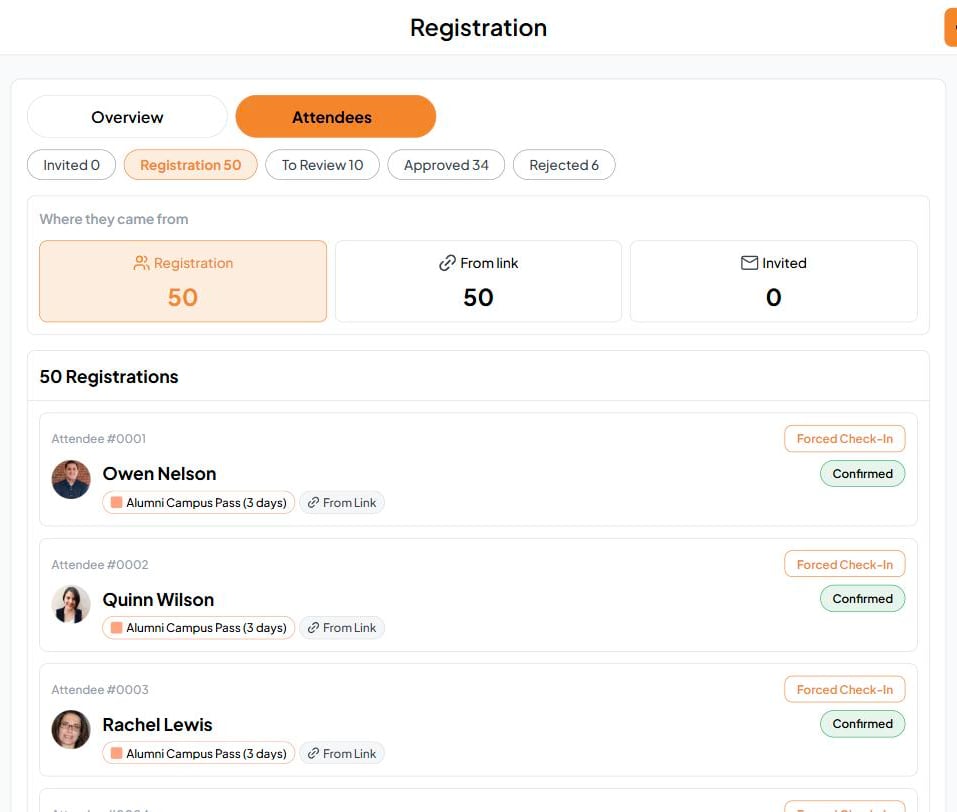
Check-in by session
For a multi-day or multi-session event, you can also check people in to a single activity. Open the Event Schedule and tap Guest Check-In on that activity. The dashboard’s timeline shows how many are checked in to each one.Spot tiers at a glance
Each attendee shows their tier and its badge color, so your team can tell a 3-day pass from a day pass, or General Admission from VIP, at a glance.This is different from Check-In at an RSVP Event, where guests mark themselves as arrived.