> ## Documentation Index
> Fetch the complete documentation index at: https://docs.fastparty.ai/llms.txt
> Use this file to discover all available pages before exploring further.
# Attendee Check-In
> Check confirmed attendees in at the door by scanning their QR code, or check them in by hand.
At a Registration Event, check-in is tied to registration. Every confirmed attendee has a ticket with a unique QR code, and only confirmed attendees can be checked in. Pending or rejected registrations can't.
## QR code check-in
The fastest way through a busy entrance:
* Each attendee's ticket carries a unique QR code, in their confirmation message and in the app.
* At the door, you or your team scan the code.
* The attendee is checked in instantly, and the count updates on the [Event Dashboard](/private-events/event-dashboard) for everyone on your team.
For conferences and large events, run several check-in points on different phones or tablets to handle the rush.
## Check someone in by hand
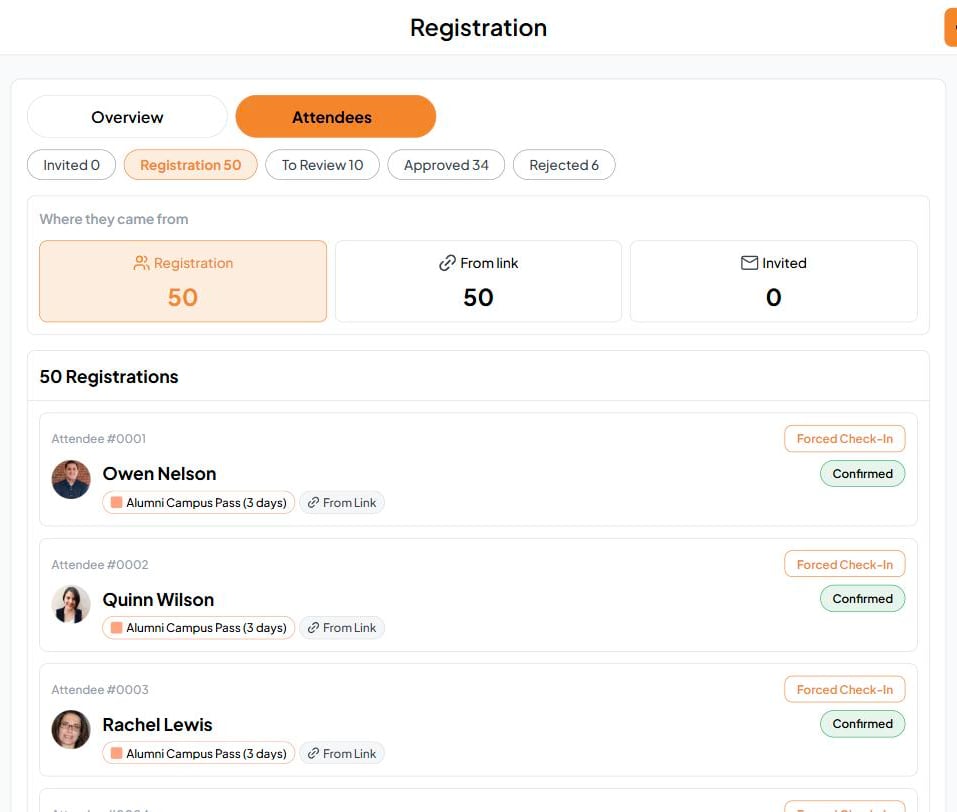
If an attendee can't find their QR code, open **Registration**, go to the **Attendees** tab, find them, and tap **Forced Check-In**.
 ## Check-in by session
For a multi-day or multi-session event, you can also check people in to a single activity. Open the [Event Schedule](/private-events/event-schedule) and tap **Guest Check-In** on that activity. The dashboard's timeline shows how many are checked in to each one.
## Spot tiers at a glance
Each attendee shows their tier and its badge color, so your team can tell a 3-day pass from a day pass, or General Admission from VIP, at a glance.
This is different from [Check-In](/private-events/self-check-in) at an RSVP Event, where guests mark themselves as arrived.
This documentation is built and hosted on [Mintlify](https://mintlify.com), a developer documentation platform.
## Check-in by session
For a multi-day or multi-session event, you can also check people in to a single activity. Open the [Event Schedule](/private-events/event-schedule) and tap **Guest Check-In** on that activity. The dashboard's timeline shows how many are checked in to each one.
## Spot tiers at a glance
Each attendee shows their tier and its badge color, so your team can tell a 3-day pass from a day pass, or General Admission from VIP, at a glance.
This is different from [Check-In](/private-events/self-check-in) at an RSVP Event, where guests mark themselves as arrived.
This documentation is built and hosted on [Mintlify](https://mintlify.com), a developer documentation platform.