> ## Documentation Index
> Fetch the complete documentation index at: https://docs.fastparty.ai/llms.txt
> Use this file to discover all available pages before exploring further.
# Tasks
> Create a pre-event checklist to stay on track.
Tasks give you a place to track everything that needs to happen before the event — from booking vendors to buying decorations.
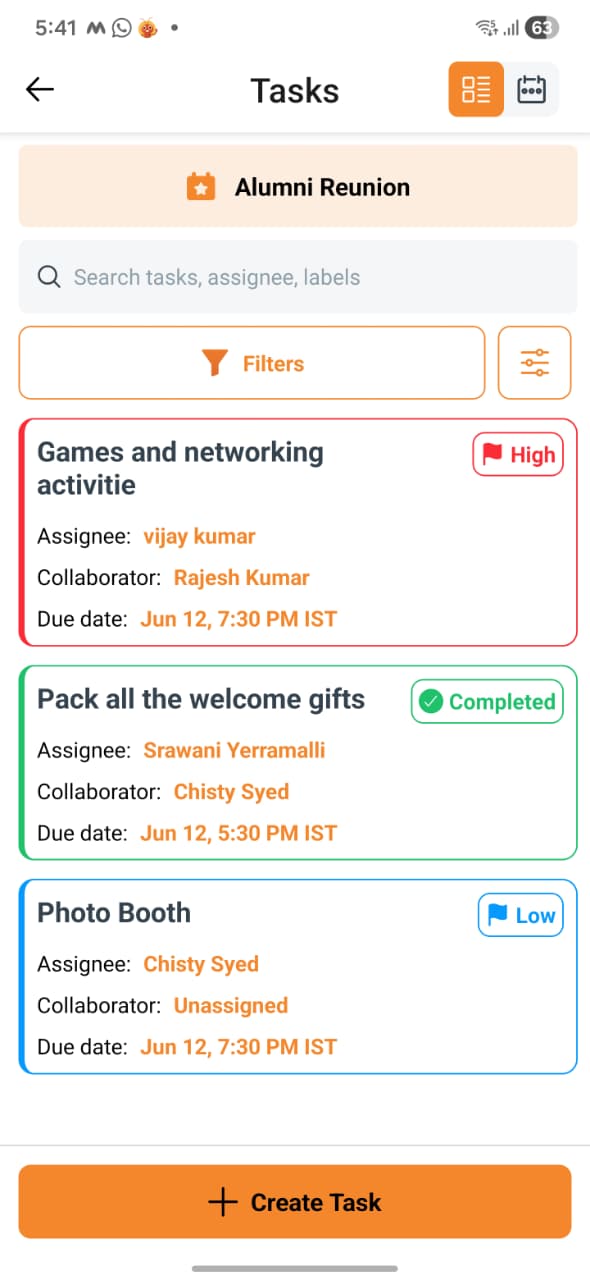 ## Creating tasks
Go to the **Tasks** tab of your event and click **Add task**. Each task has:
| Field | Details |
| --------------- | ---------------------------------------------------------------- |
| **Title** | What needs to be done — e.g. "Book the caterer", "Order flowers" |
| **Due date** | When it needs to be completed |
| **Assigned to** | Yourself or a co-host (optional) |
| **Notes** | Any extra context or instructions |
## Task status
Each task has one of three statuses:
| Status | Meaning |
| --------------- | --------------- |
| **Open** | Not yet started |
| **In progress** | Being worked on |
| **Complete** | Done |
Update the status as you work through your checklist.
## Assigning tasks
Tasks can be assigned to anyone involved in your event — guests, hosts, co-hosts, and vendors. When you assign a task to someone, they receive an email notification with the task details and due date.
You can also add a collaborator to a task. A collaborator can be any of the above, but they can also be someone who isn't part of the event at all — for example, a driver, a contractor, or an external helper who only needs to see and act on that one task. This lets you bring in outside people for specific responsibilities without adding them to the guest list or giving them access to the rest of the event.
## Tracking progress
The Tasks view shows all tasks sorted by due date. You can filter by status or assignee to focus on what matters right now. Overdue tasks are highlighted so they're easy to spot.
## Creating tasks
Go to the **Tasks** tab of your event and click **Add task**. Each task has:
| Field | Details |
| --------------- | ---------------------------------------------------------------- |
| **Title** | What needs to be done — e.g. "Book the caterer", "Order flowers" |
| **Due date** | When it needs to be completed |
| **Assigned to** | Yourself or a co-host (optional) |
| **Notes** | Any extra context or instructions |
## Task status
Each task has one of three statuses:
| Status | Meaning |
| --------------- | --------------- |
| **Open** | Not yet started |
| **In progress** | Being worked on |
| **Complete** | Done |
Update the status as you work through your checklist.
## Assigning tasks
Tasks can be assigned to anyone involved in your event — guests, hosts, co-hosts, and vendors. When you assign a task to someone, they receive an email notification with the task details and due date.
You can also add a collaborator to a task. A collaborator can be any of the above, but they can also be someone who isn't part of the event at all — for example, a driver, a contractor, or an external helper who only needs to see and act on that one task. This lets you bring in outside people for specific responsibilities without adding them to the guest list or giving them access to the rest of the event.
## Tracking progress
The Tasks view shows all tasks sorted by due date. You can filter by status or assignee to focus on what matters right now. Overdue tasks are highlighted so they're easy to spot.