> ## Documentation Index
> Fetch the complete documentation index at: https://docs.fastparty.ai/llms.txt
> Use this file to discover all available pages before exploring further.
# Potluck
> Organise potluck contributions with a simple sign-up sheet for your guests.
The Potluck feature gives your guests a clear sign-up sheet so everyone knows what to bring — and you always know what's covered.
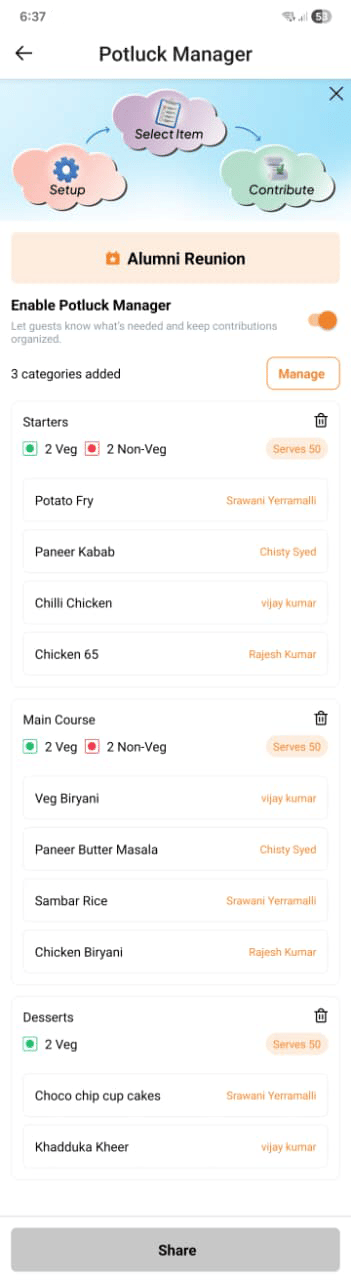 ## Creating a potluck
Go to the **Potluck** tab of your event and set up your categories. For each category you can define:
| Field | Details |
| -------------------- | ----------------------------------------------------------- |
| **Category name** | e.g. Main Dishes, Salads, Desserts, Drinks, Sides, Snacks |
| **Number of slots** | How many contributions you need in this category |
| **Portion guidance** | Optional — e.g. "serves 6" so guests know how much to bring |
You can have as many categories as you need.
## Publishing the potluck
The sign-up sheet is hidden from guests until you publish it. Once published, guests see the categories and available slots on their invitation page and can claim a slot and enter what they plan to bring.
You can re-publish after edits — changes appear for guests straight away.
## Tracking contributions
From the **Potluck** tab, you can see:
* Which slots are filled and which are still open
* Each guest's name and what they've signed up to bring
* A count of how many slots remain across all categories
You can send a reminder to guests who haven't signed up yet.
## Editing after publishing
You can adjust categories and slot counts after the potluck is published. Guests who have already signed up are not affected unless you specifically remove a slot that's already been claimed.
Ask Antsy to set up your potluck: "Create a potluck with mains, sides, and desserts — 3 of each — and publish it." Antsy builds and publishes the sign-up in seconds.
## Creating a potluck
Go to the **Potluck** tab of your event and set up your categories. For each category you can define:
| Field | Details |
| -------------------- | ----------------------------------------------------------- |
| **Category name** | e.g. Main Dishes, Salads, Desserts, Drinks, Sides, Snacks |
| **Number of slots** | How many contributions you need in this category |
| **Portion guidance** | Optional — e.g. "serves 6" so guests know how much to bring |
You can have as many categories as you need.
## Publishing the potluck
The sign-up sheet is hidden from guests until you publish it. Once published, guests see the categories and available slots on their invitation page and can claim a slot and enter what they plan to bring.
You can re-publish after edits — changes appear for guests straight away.
## Tracking contributions
From the **Potluck** tab, you can see:
* Which slots are filled and which are still open
* Each guest's name and what they've signed up to bring
* A count of how many slots remain across all categories
You can send a reminder to guests who haven't signed up yet.
## Editing after publishing
You can adjust categories and slot counts after the potluck is published. Guests who have already signed up are not affected unless you specifically remove a slot that's already been claimed.
Ask Antsy to set up your potluck: "Create a potluck with mains, sides, and desserts — 3 of each — and publish it." Antsy builds and publishes the sign-up in seconds.