> ## Documentation Index
> Fetch the complete documentation index at: https://docs.fastparty.ai/llms.txt
> Use this file to discover all available pages before exploring further.
# Food & Beverage Preferences
> Collect dietary preferences from your guests so you can plan your menu with confidence.
The Food & Beverage feature lets you find out what your guests can and can't eat before the event — so you can plan your menu with confidence.
Food preference data is shown only to you as the event organiser. Guests only see the options, not each other's selections.
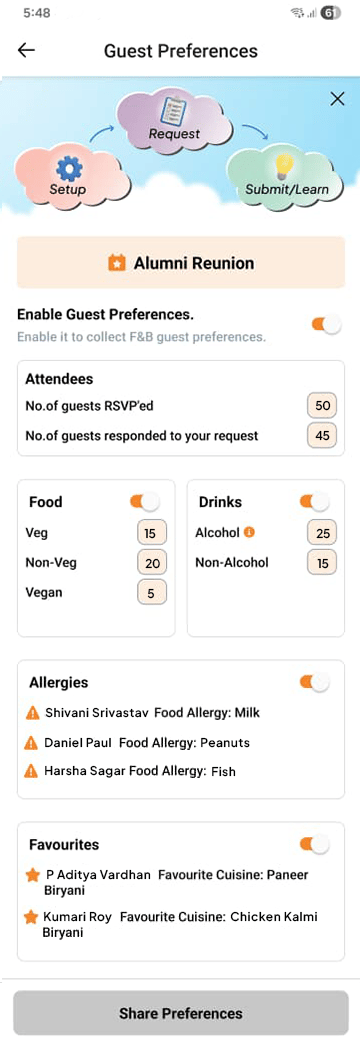 ## Setting up preferences
Go to the **Food & Beverage** tab of your event and add the dietary options relevant to your menu. Common options include:
* No restrictions
* Vegetarian
* Vegan
* Gluten-free
* Dairy-free
* Nut allergy
* Halal
* Kosher
You can add your own custom options for any event — for example, "No seafood" or "Low-sodium."
## Enabling guest responses
Preferences are hidden from guests until you enable them. Once enabled, guests see the options on their invitation page and can select whatever applies to them.
You can enable and disable guest responses at any time without losing the data already collected.
## Viewing responses
From the **Food & Beverage** tab, you can:
* See a summary count for each preference option (e.g. "4 guests selected Vegetarian")
* View individual guest selections
* Export the full list as a spreadsheet — useful for sharing with a caterer or planning your shopping
Ask Antsy to set things up for you: "Set up vegetarian, vegan, gluten-free, and nut-allergy options and enable guests to select them." Antsy creates and enables the options in one step.
## Setting up preferences
Go to the **Food & Beverage** tab of your event and add the dietary options relevant to your menu. Common options include:
* No restrictions
* Vegetarian
* Vegan
* Gluten-free
* Dairy-free
* Nut allergy
* Halal
* Kosher
You can add your own custom options for any event — for example, "No seafood" or "Low-sodium."
## Enabling guest responses
Preferences are hidden from guests until you enable them. Once enabled, guests see the options on their invitation page and can select whatever applies to them.
You can enable and disable guest responses at any time without losing the data already collected.
## Viewing responses
From the **Food & Beverage** tab, you can:
* See a summary count for each preference option (e.g. "4 guests selected Vegetarian")
* View individual guest selections
* Export the full list as a spreadsheet — useful for sharing with a caterer or planning your shopping
Ask Antsy to set things up for you: "Set up vegetarian, vegan, gluten-free, and nut-allergy options and enable guests to select them." Antsy creates and enables the options in one step.