> ## Documentation Index
> Fetch the complete documentation index at: https://docs.fastparty.ai/llms.txt
> Use this file to discover all available pages before exploring further.
# Event Banner and Templates
> Your banner and event template are the first thing guests see. Here's why they matter, the sizes to use, and how to add them.
Before anyone reads a word about your event, they see its pictures. The **event template** is the invitation card people receive and share. The **banner** runs across the top of every page of your event. Together they set the mood, tell people at a glance what kind of event it is, and make your event instantly recognizable in a busy WhatsApp chat or circle feed.
Add both to every event. It takes a few minutes, and it's the difference between an event that looks like a form and one people are excited to open.
 ## The two images
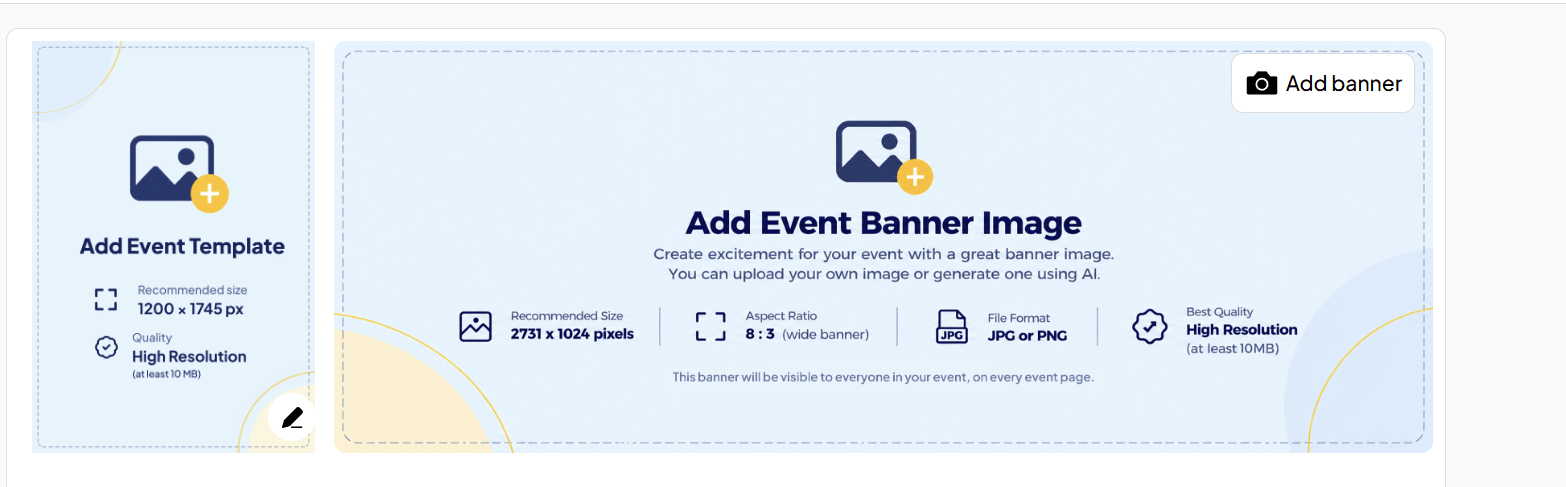
A tall, portrait image: your invitation card. It's what guests see first when you share the event, and what they forward to others.
A wide image across the top of the event. It's visible to everyone in your event, on every event page.
## Sizes to use
Use these sizes so your images look sharp and nothing important gets cropped.
| | Event template | Event banner |
| - | - | - |
| **Recommended size** | 1200 × 1745 px | 2731 × 1024 px |
| **Shape** | Portrait | Wide, 8:3 aspect ratio |
| **File format** | JPG or PNG | JPG or PNG |
| **Quality** | High resolution | High resolution |
## Add an event template
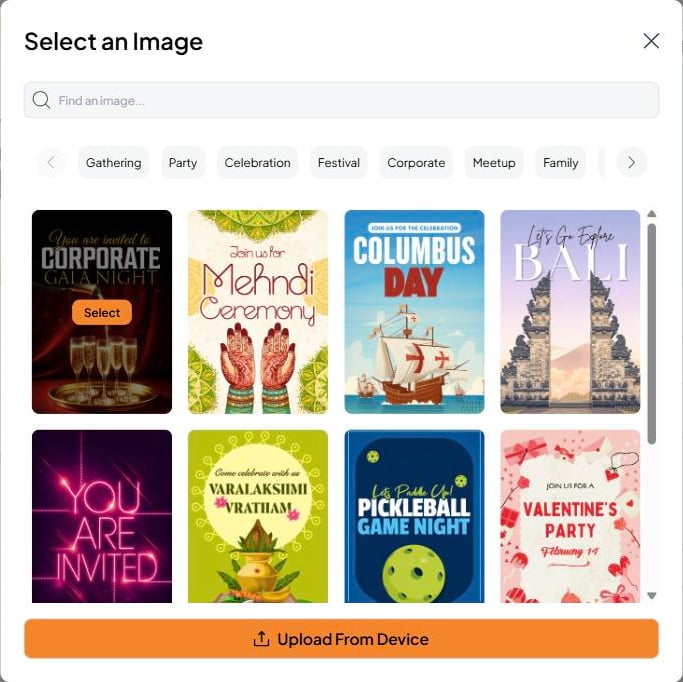
Click the pencil on the event template, when you create the event or any time after. You can:
* **Pick one from our template store.** Search, or browse by category: Gathering, Party, Celebration, Festival, Corporate, Meetup, Family, Night, Outdoors and Kids. You can also browse the full collection on the website's [Celebration Hub](https://www.fastparty.ai/celebration-hub).
* **Upload From Device** to use your own design.
## The two images
A tall, portrait image: your invitation card. It's what guests see first when you share the event, and what they forward to others.
A wide image across the top of the event. It's visible to everyone in your event, on every event page.
## Sizes to use
Use these sizes so your images look sharp and nothing important gets cropped.
| | Event template | Event banner |
| - | - | - |
| **Recommended size** | 1200 × 1745 px | 2731 × 1024 px |
| **Shape** | Portrait | Wide, 8:3 aspect ratio |
| **File format** | JPG or PNG | JPG or PNG |
| **Quality** | High resolution | High resolution |
## Add an event template
Click the pencil on the event template, when you create the event or any time after. You can:
* **Pick one from our template store.** Search, or browse by category: Gathering, Party, Celebration, Festival, Corporate, Meetup, Family, Night, Outdoors and Kids. You can also browse the full collection on the website's [Celebration Hub](https://www.fastparty.ai/celebration-hub).
* **Upload From Device** to use your own design.
 ### Multi-day events: a template for each day
**Every event can be a multi-day event**, whether it's an RSVP Event, a Registration Event or an Open Event. Each day can have its **own invitation template**, up to **5 templates** per event, from the store, your own designs, or a mix.
That's ideal for a wedding with a Mehendi, Sangeet and reception, a three-day festival, or a conference with a different theme each day: guests get a card that matches the day they're invited to.
## Add a banner
On the Event Page, click **Add banner** in the top-right corner of the banner area. You can:
* **Upload your own** image
* **Generate one with AI** right in Fast Party
Connected to Claude or ChatGPT? You can ask it for a banner too: "Create a banner for my event at 8:3 ratio with our sponsors' names on it." [Connect your AI →](/platforms#connect-your-ai)
## Tips for great event images
* **Use the recommended sizes.** Smaller images look blurry on large screens, and other shapes get cropped.
* **Match the occasion.** A reunion, a club night and a wedding should each feel like themselves at a glance.
* **Add both.** The template is what gets shared, and the banner is what greets people once they arrive on your event.
This documentation is built and hosted on [Mintlify](https://mintlify.com), a developer documentation platform.
### Multi-day events: a template for each day
**Every event can be a multi-day event**, whether it's an RSVP Event, a Registration Event or an Open Event. Each day can have its **own invitation template**, up to **5 templates** per event, from the store, your own designs, or a mix.
That's ideal for a wedding with a Mehendi, Sangeet and reception, a three-day festival, or a conference with a different theme each day: guests get a card that matches the day they're invited to.
## Add a banner
On the Event Page, click **Add banner** in the top-right corner of the banner area. You can:
* **Upload your own** image
* **Generate one with AI** right in Fast Party
Connected to Claude or ChatGPT? You can ask it for a banner too: "Create a banner for my event at 8:3 ratio with our sponsors' names on it." [Connect your AI →](/platforms#connect-your-ai)
## Tips for great event images
* **Use the recommended sizes.** Smaller images look blurry on large screens, and other shapes get cropped.
* **Match the occasion.** A reunion, a club night and a wedding should each feel like themselves at a glance.
* **Add both.** The template is what gets shared, and the banner is what greets people once they arrive on your event.
This documentation is built and hosted on [Mintlify](https://mintlify.com), a developer documentation platform.